目录
了解 Homebrew
🍺 The missing package manager for macOS (or Linux)
Homebrew 是 macOS(及 Linux)的包管理工具
安装 Homebrew
参照官网的安装方式,执行下面的命令,根据提示即可完成安装
/bin/bash -c "$(curl -fsSL https://raw.githubusercontent.com/Homebrew/install/HEAD/install.sh)"过程中可能提示需要安装 Command Line Tools (CLT) for Xcode。
国内网络环境也可使用清华镜像站 Homebrew 软件仓库安装,如下步骤:
# 安装 Command Line Tools (CLT) for Xcode
xcode-select --install

# 设置 Homebrew 环境变量
export HOMEBREW_BREW_GIT_REMOTE="https://mirrors.tuna.tsinghua.edu.cn/git/homebrew/brew.git"
export HOMEBREW_CORE_GIT_REMOTE="https://mirrors.tuna.tsinghua.edu.cn/git/homebrew/homebrew-core.git"
export HOMEBREW_INSTALL_FROM_API=1
export HOMEBREW_API_DOMAIN="https://mirrors.tuna.tsinghua.edu.cn/homebrew-bottles/api"
export HOMEBREW_BOTTLE_DOMAIN="https://mirrors.tuna.tsinghua.edu.cn/homebrew-bottles"

# 从镜像下载安装脚本并安装 Homebrew
git clone --depth=1 https://mirrors.tuna.tsinghua.edu.cn/git/homebrew/install.git brew-install
/bin/bash brew-install/install.sh
rm -rf brew-install

# 安装成功后需将 brew 程序的相关路径加入到环境变量中
test -r ~/.bash_profile && echo 'eval "$(/opt/homebrew/bin/brew shellenv)"' >> ~/.bash_profile
test -r ~/.zprofile && echo 'eval "$(/opt/homebrew/bin/brew shellenv)"' >> ~/.zprofile
(可选)切换至 Homebrew 清华镜像站
# Homebrew 软件仓库
test -r ~/.bash_profile && echo 'export HOMEBREW_BREW_GIT_REMOTE="https://mirrors.tuna.tsinghua.edu.cn/git/homebrew/brew.git"' >> ~/.bash_profile  # bash
test -r ~/.bash_profile && echo 'export HOMEBREW_CORE_GIT_REMOTE="https://mirrors.tuna.tsinghua.edu.cn/git/homebrew/homebrew-core.git"' >> ~/.bash_profile
test -r ~/.profile && echo 'export HOMEBREW_BREW_GIT_REMOTE="https://mirrors.tuna.tsinghua.edu.cn/git/homebrew/brew.git"' >> ~/.profile
test -r ~/.profile && echo 'export HOMEBREW_CORE_GIT_REMOTE="https://mirrors.tuna.tsinghua.edu.cn/git/homebrew/homebrew-core.git"' >> ~/.profile

test -r ~/.zprofile && echo 'export HOMEBREW_BREW_GIT_REMOTE="https://mirrors.tuna.tsinghua.edu.cn/git/homebrew/brew.git"' >> ~/.zprofile  # zsh
test -r ~/.zprofile && echo 'export HOMEBREW_CORE_GIT_REMOTE="https://mirrors.tuna.tsinghua.edu.cn/git/homebrew/homebrew-core.git"' >> ~/.zprofile

# Homebrew Bottles 软件仓库
test -r ~/.bash_profile && echo 'export HOMEBREW_API_DOMAIN="https://mirrors.tuna.tsinghua.edu.cn/homebrew-bottles/api"' >> ~/.bash_profile
test -r ~/.bash_profile && echo 'export HOMEBREW_BOTTLE_DOMAIN="https://mirrors.tuna.tsinghua.edu.cn/homebrew-bottles"' >> ~/.bash_profile

test -r ~/.zprofile && echo 'export HOMEBREW_API_DOMAIN="https://mirrors.tuna.tsinghua.edu.cn/homebrew-bottles/api"' >> ~/.zprofile
test -r ~/.zprofile && echo 'export HOMEBREW_BOTTLE_DOMAIN="https://mirrors.tuna.tsinghua.edu.cn/homebrew-bottles"' >> ~/.zprofile
或者手动将以下内容添加至 ~/.profile、~/.bash_profile、~/.zprofile中
# Homebrew
export HOMEBREW_API_DOMAIN="https://mirrors.tuna.tsinghua.edu.cn/homebrew-bottles/api"
export HOMEBREW_BOTTLE_DOMAIN="https://mirrors.tuna.tsinghua.edu.cn/homebrew-bottles"
export HOMEBREW_BREW_GIT_REMOTE="https://mirrors.tuna.tsinghua.edu.cn/git/homebrew/brew.git"
export HOMEBREW_CORE_GIT_REMOTE="https://mirrors.tuna.tsinghua.edu.cn/git/homebrew/homebrew-core.git"
export HOMEBREW_PIP_INDEX_URL="https://mirrors.tuna.tsinghua.edu.cn/pypi/simple"
Homebrew 术语
| 英文术语 | 中文解释 |
|---|---|
| formula | Homebrew 软件包,用于从上游源代码构建软件,简单理解成命令行工具 |
| cask | Homebrew 软件包,用于安装 macOS 原生应用程序,简单理解成App软件 |
| prefix | Homebrew 的安装路径,例如 /opt/homebrew 或 /home/linuxbrew/.linuxbrew |
| keg | 特定版本formula的安装目标目录,例如 /opt/homebrew/Cellar/foo/0.1 |
| rack | 包含一个或多个版本化 keg 的目录,例如 /opt/homebrew/Cellar/foo |
| keg-only | 表示该formula不会被软链接到 Homebrew 的 prefix 目录 |
| opt prefix | 指向活跃版本 keg 的符号链接,例如 /opt/homebrew/opt/foo |
| Cellar | 包含一个或多个命名 racks 的目录,例如 /opt/homebrew/Cellar |
| Caskroom | 包含一个或多个命名 casks 的目录,例如 /opt/homebrew/Caskroom |
| external command | 在 Homebrew/brew 仓库外定义的 brew 子命令 |
| tap | formula、casks 和/或外部命令的目录(通常为 Git 仓库) |
| bottle | 预构建的 keg,可直接倒入 Cellar 的 rack 而非从源码构建 |
了解常用的 formula、cask 和 tap 即可
常用 Homebrew 命令
搜索 Formula 和 Cask
brew search <名称>支持模糊搜索
如,查询富途相关 Formula 或 Cask brew search futu
❯ brew search futu
==> Casks
fugu                    futubull                 futurerestore-gui
查看 Formula/Cask 信息
brew info <名称>如,查询 futubull 的详细信息 brew info futubull
❯ brew info futubull
==> futubull: 15.18.11708
https://www.futunn.com/
Not installed
From: https://github.com/Homebrew/homebrew-cask/blob/HEAD/Casks/f/futubull.rb
==> Names
Futubull
FutuNiuniu
==> Description
Trading application
==> Artifacts
富途牛牛.app -> Futubull.app (App)
==> Analytics
install: 41 (30 days), 119 (90 days), 377 (365 days)
安装 Formula/Cask
brew install <名称>卸载 Formula/Cask
brew uninstall <名称>列出已安装 Formula 和 Cask
brew list清理安装包
brew cleanup管理后台服务
Nginx、MySQL 等软件没有用户界面,后台运行以提供服务,可以使用 brew services 系列命令对服务进行管理
| 操作 | 命令 |
|---|---|
| 查看所有服务 | brew services list |
| 运行某个服务 | brew services run <服务名> |
| 运行某个服务并设置开机自启 | brew services start <服务名> |
| 停止某个服务 | brew services stop <服务名> |
| 重启某个服务 | brew services restart <服务名> |
更多指令详情参见官方使用手册 COMMAND 指令一节
如何向 Homebrew 提交新的软件
在 Homebrew 添加一个 Formula/Cask 其实是向 Homebrew Core 仓库/ Homebrew Cask 仓库提交一个 Ruby 脚本文件,脚本中描述该软件的信息,并告诉 Homebrew 如何下载、安装和卸载。
官方 Cask 示例
来源:https://docs.brew.sh/Adding-Software-to-Homebrew#examples
cask "pomello" do
  version "0.10.17"
  sha256 :no_check

  url "https://pomelloapp.com/download/mac/latest"
  name "Pomello"
  desc "Turns your Trello cards into Pomodoro tasks"
  homepage "https://pomelloapp.com/"

  livecheck do
    url :url
    strategy :header_match
  end

  app "Pomello.app"

  zap trash: [
    "~/Library/Application Support/com.apple.sharedfilelist/com.apple.LSSharedFileList.ApplicationRecentDocuments/com.tinynudge.pomello.*",
    "~/Library/Application Support/Pomello",
    "~/Library/Caches/com.tinynudge.pomello",
    "~/Library/Caches/com.tinynudge.pomello.ShipIt",
    "~/Library/HTTPStorages/com.tinynudge.pomello",
    "~/Library/Preferences/com.tinynudge.pomello.plist",
    "~/Library/Saved Application State/com.tinynudge.pomello.savedState",
  ]
endpomello.rb
关键词解释
| 字段名 | 描述说明 |
|---|---|
name | 应用程序名称(需包含供应商定义的完整名称及有用别名) |
version | 应用程序版本号 |
sha256 | 文件的SHA-256校验值(通过 shasum -a 256 <文件> 计算获得;可用 :no_check 忽略校验) |
url | 指向.dmg/.zip/.tgz/.tbz2安装包的下载链接(若域名与 homepage 不一致需添加 verified 参数) |
desc | 软件的一行简要描述 |
homepage | 软件官网地址(用于 brew home 命令) |
livecheck | Ruby代码块(用于定义版本更新检测逻辑) |
app | 相对路径下的.app程序包(安装时会移动到 /Applications 目录) |
zap | 深度卸载指令(包含配置文件和共享资源的清理操作) |
提交一个 futubull@legacy
获取下载地址
从富途官网的请求接口,拿到获取最新链接的请求接口
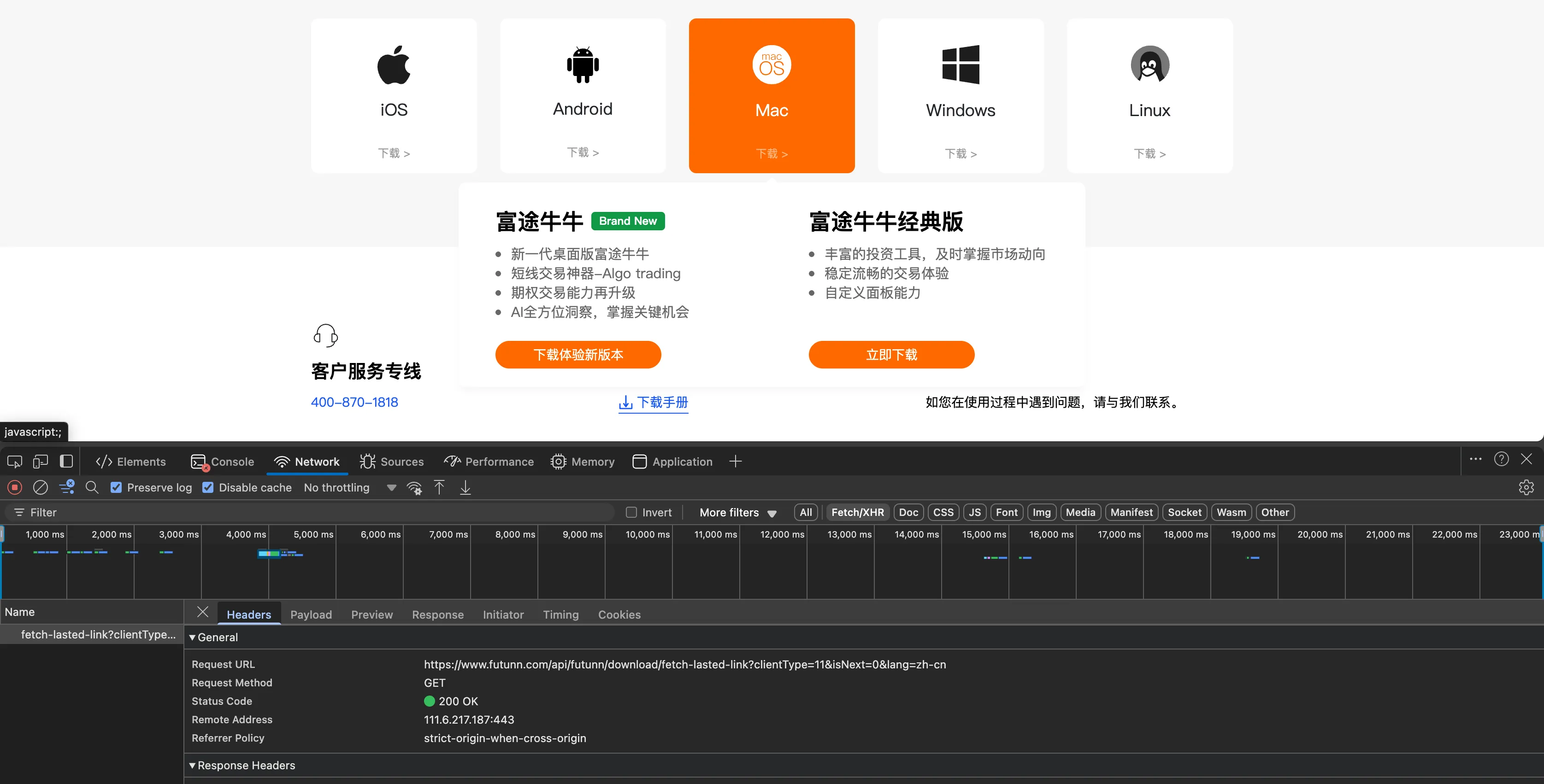
接口响应
{
  "code": 0,
  "message": "成功",
  "data": {
    "link": "https://softwaredownload.futunn.com/FTNN_legacy_15.17.11608_Website.dmg",
    "status": "success"
  }
}
创建一个 Cask
执行以下命令
brew tap --force homebrew/cask # 下载 Homebrew cask 仓库到本地

$(brew --repository homebrew/cask)/developer/bin/generate_cask_token "futubull@legacy" # 生成一个 token

brew create --cask https://softwaredownload.futunn.com/FTNN_legacy_15.17.11608_Website.dmg --set-name "futubull@legacy" # 创建一个 Cask
Homebrew 会自动以 --set-name 参数的值创建一个同名的文件(如本次的futubull@legacy),并打开一个文本编辑器,用命令行中的 URL 和名称自动填充部分信息,接下来编写并修改部分脚本内容。
编写 futubull@legacy 脚本
cask "futubull@legacy" do
  version "15.17.11608"
  sha256 :no_check

  url "https://softwaredownload.futunn.com/FTNN_legacy_#{version}_Website.dmg",
      user_agent: :fake,
      referer:    "https://www.futunn.com/"
  name "Futubull Legacy For Mac"
  name "版富途牛牛 Mac 桌面经典版"
  desc "Futubull trading application"
  homepage "https://www.futunn.com/"

  livecheck do
    url "https://www.futunn.com/api/futunn/download/fetch-lasted-link?clientType=11&isNext=0"
    regex(/FTNN_legacy[._-]v?(\d+(?:\.\d+)+)[._-]Website\.dmg/i)
  end

  auto_updates true
  depends_on macos: ">= :high_sierra"

  app "FutuNiuniu.app"

  uninstall quit: "cn.futu.niuniu"

  zap trash: [
    "~/Library/Application Scripts/cn.futu.Niuniu",
    "~/Library/Containers/cn.futu.Niuniu",
    "~/Library/Containers/cn.futu.niuniu.nx",
  ]
end
[email protected]
测试和审查
详情参考「测试和审查 Cask 章节」。
本地测试安装
export HOMEBREW_NO_AUTO_UPDATE=1
export HOMEBREW_NO_INSTALL_FROM_API=1

brew install futubull@legacy
看是否成功安装,若未正常安装,则使用 brew edit 命令进行编辑
brew edit futubull@legacy测试卸载是否成功
brew uninstall futubull@legacy如果一切都顺利,则可使用 brew audit 进行审查
brew audit --new --cask futubull@legacy最后需要使用 brew style 检查并修复代码样式
brew style --fix futubull@legacy提交 Cask 至官方仓库
详细参考「提交 Cask 章节」
# 切换至 Homebrew Cask 仓库
cd "$(brew --repository)"/Library/Taps/homebrew/homebrew-cask

# 查看本地 Git 仓库状态
git status

# 创建并切换至新分支
git checkout -b futubull-at-legacy

# 添加 Cask Ruby 脚本文件
git add Casks/f/[email protected]

# 查看当前的改动
git diff --cached

# 写 commit 信息并创建 commit
git commit -v
完成以上步骤后需要 Fork 官方 Homebrew Cask 仓库至自己 GitHub 账号,将改动提交至自己仓库,详细步骤见如何向 Homebrew 提交 Pull Request 官方指引
最后,向官方仓库提交 Pull Request,可参考提交 futubull@legacy 的 PR 记录。